
Studied Isn't the Same as Learned
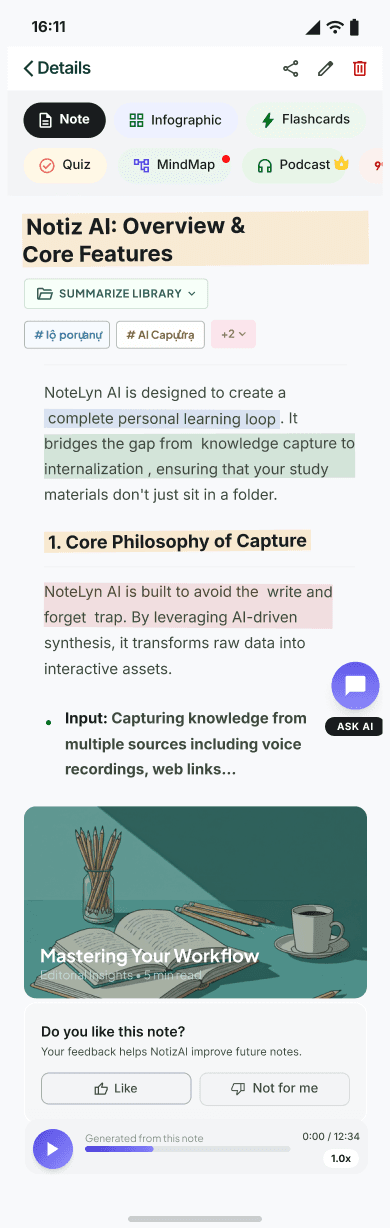
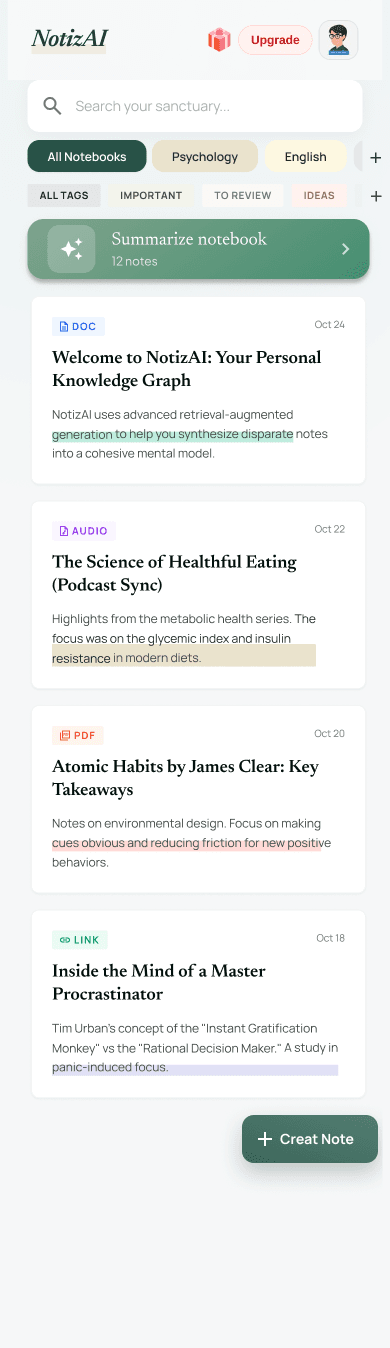
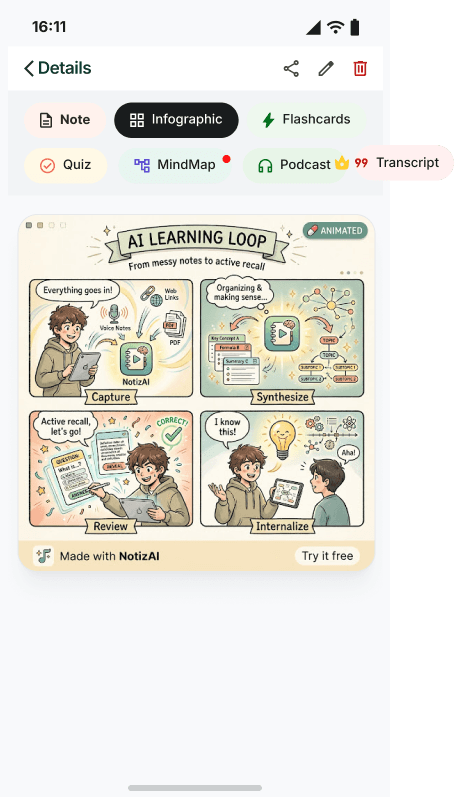
Most of what you save is never truly mastered. Drop in a recorded lecture, a PDF, a video link or a snapshot — NotizAI organizes it, builds a note infographic, and walks you from input to review to genuine recall.
- Six precise ways in: typing, live recording, audio files, PDFs, links and photo OCR
- AI reorders the mess into a clean, structured study note you can actually read
- Note infographics, flashcards, quizzes and a commute podcast close the learning loop
Scan with your phone camera, or tap a button below.
The gap between saving and knowing
Studied Isn't the Same as Learned
What NotizAI does for you
Study material piles up across apps, photos and downloads — and sorting it eats your evening.
Six input paths feed one place; NotizAI auto-structures everything into a clean, German-tidy study note.
You read it once, feel productive, then forget it by exam week.
Flashcards and quizzes are generated for you and resurfaced on a spaced schedule until recall is real.
A dense paragraph or a tricky derivation just won't click.
Ask the built-in tutor in plain language — every answer is grounded in your own material.
Why it changes how you learn
time lost to sorting and re-typing notes
of saved material that actually gets reviewed
faster from raw capture to exam-ready
Bring whatever you've got
Every format you add becomes searchable, structured and ready to study.
- 01
Type it
A clean rich-text editor with autosave so a draft is never lost mid-thought.
- 02
Record it
Crisp, noise-reduced recording with a live transcript scrolling as you listen.
- 03
Upload audio
Send in MP3, WAV or M4A files and let language detection sort the rest.
- 04
Import PDFs
Headings, sections and figures are parsed into a readable outline.
- 05
Add links
Pull captions from a video or the main text from an article — ads stripped out.
- 06
Scan photos
OCR lifts text out of slides, textbooks and handwriting in many languages.
Turn one note into a full study kit
From first read to real recall, every tool lives in the same note.
Built for the way you really study and work
Meetings: from a noisy room to clear decisions
- Multi-speaker recording with who-said-what labelling
- A summary that surfaces decisions, risks and next steps
- Every task lands with an owner and a due date
- Share the minutes or flip key points into flashcards
Lectures: listen now, remember later
- Record the room or import the slide deck as a PDF
- A structured outline with concepts and highlights builds itself
- Flashcards and quizzes feed a spaced-review schedule
- Ask the tutor the moment something stops making sense
See it on real material
Share what you've made
- Hand off minutes or a summary with a single link
- Decide who can view before you send it
- Export to text, PDF or a high-res note infographic
- Turn a shared note into ready-made review material
Learners who closed the loop
“Two hours of anatomy lectures become a tidy outline plus flashcards before I leave the building. The spaced reviews are why it finally stuck for the exam.”
Lena Brandt
Medical student
“I drop my prep PDFs in, take the auto-quizzes on the train, and the error notebook tells me exactly what to re-read. Passed on the first attempt.”
Tomás Reyes
PMP candidate
“Paper links go in, a note infographic comes out — I can grasp a study's argument at a glance before deciding whether to read it fully.”
Yuki Tanaka
PhD researcher
“I photograph a textbook page, OCR pulls the text, and the podcast lets me review vocabulary while I run. The commute is no longer dead time.”
Sofia Albrecht
Language learner
“Our design reviews used to vanish into a recording nobody replayed. Now the minutes, decisions and action items are ready before we leave the call.”
David Okonkwo
Engineering lead
Questions, answered
Who is NotizAI really for?+
Anyone closing the gap between saving and knowing — students cramming for exams, professionals chasing a certification, and self-learners working through courses, papers and videos.
What can I feed it?+
Typed notes, live recordings, uploaded audio, PDFs, web and video links, and photos read with OCR. Mix several in a single note.
Does it need a connection?+
AI organizing and review tools run online. You can still jot and draft offline, and everything syncs once you reconnect.
What is a note infographic?+
An auto-generated visual that lays out a note's key points as an editorial one-pager — handy for a fast recap or for sharing.
How does the privacy side work?+
Your material stays yours, used only to power the features you ask for. Delete your account to wipe everything. Details live in the Privacy Policy.
Which languages does it handle?+
OCR, transcription and translation cover many languages. Tell support if you need a specific one confirmed.
Is my content used to train AI models?+
No. We never hand your notes to third-party model training. See the Privacy Policy.
How reliable are the transcripts and summaries?+
We push for precision, but clean input gives the best result. Anything off is a quick edit-and-regenerate away.
Your material, your call
- Your notes belong to you — never to a training set
- Delete your account and every file goes with it
- Read the specifics in our Privacy Policy
Stop collecting. Start learning.
Scan the code or grab it from your app store.
Scan with your phone camera, or tap a button below.